What Is RSS?Click on any orange RSS button to get the latest Web pages from this site. You can use them anywhere else on the Web (they're everywhere nowadays) to get newsfeeds from CNN or BBC, or just about anything else, including news on upcoming movies and DVD releases, your favorite musician's tour updates, etc. Once you get started, it's like having your favorite parts of the Web come to you. No need to go out and check for updates all the time. No need for bookmarks! "RSS" means "Really Simple Syndication." But that's just a fancy way of saying that you can keep up with all the updates to this site without having to check the site every week to see "what's new." New pages and updates to old ones are released through RSS. How do you get started? Easy! Download a free RSS Reader first. This is special software that reads the RSS feeds... Windows -- RssReader Mac -- NetNewsWire Once you're set up, here's all you have to do... Right-click (or control-click for Mac users) on the orange RSS button on any page of this site, or any blog or news source that interests you. That's it! You'll be subscribed. Look for this button on a page on this site. |
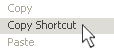 Select Copy Shortcut or Copy Link Address or Copy Link Location (what you will see depends on what browser you are using) ("Copy Link to Clipboard" on a Mac), and paste that URL into your RSS Reader.